
 Farid
Farid
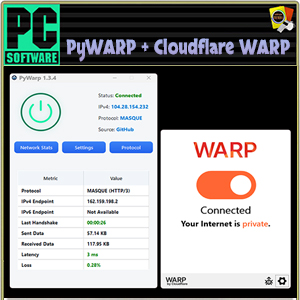
Program version: 1.3.4 / 2026 .3.851.0
Interface language: En, Persian.
System requirements:
Windows 10, Windows 8.1, Windows 11 (64 bit).
Description:
"Cloudflare WARP" (or more precisely: Cloudflare WARP + 1.1.1.1) is a WARP VPN service and a fast, private DNS server "1.1.1.1".
PyWARP is a Python library that implements the Relying Party component of the W3C WebAuthn standard. It is designed to provide advanced authentication security, including two-factor, multi-factor, and passwordless models.
using specialized hardware security keys and biometric devices.
Additional information:
The idea of combining two programs, PyWARP and Cloudflare WARP, is
It is not just about getting a new IP address (different from our real one).
This way we also get a much more reliable protection, which we know as obfuscation.
Thanks to the modern technology of the MASQUE protocol, which disguises WARP traffic as regular HTTPS,
We actually make it harder to detect and block.
PyWarp chooses the Cloudflare server with the fastest endpoint for us, which is a plus for speed.
The two levels work synchronously, without interfering with each other. Furthermore, we have the ability to change endpoints.
(you can scan faster servers).
In short, you have a working, secure, and flexible WARP configuration,
with the ability to change IP addresses and obfuscate traffic.
Available modes:
warp and warp+doh ; It’s good for browsing the web, logging in, downloading files, because it encrypts all your internet traffic and sends it through Cloudflare’s secure network.
dot and warp+dot ; uses a different technical standard (TLS instead of HTTPS) to encrypt DNS queries,
and you can use it if you have problems with DoH.
proxy ; mainly useful for creating a local proxy server,
which you can configure to transfer torrents through a client (for example, qBittorrent).
Tunnel only is the most technical mode, allowing you to route specific applications through the tunnel. It doesn’t change any computer settings, but it’s helpful to know before you begin.
^Both programs can be closed completely when you don’t need them using the system tray icons and the Exit button.
Later in the installation process we will describe how to set the warp-svc service to "Manual" mode,
so that it doesn’t load in the background.
* In the Extras folder you will find:
Clear DNS Cache – clears the DNS cache from previous work.
CloudflareWARP Speed Test – it is recommended to run it in a running state,
The results can be seen in a file named ‘result.csv’,
which opens with Notepad and displays the speed of addresses in milliseconds.
Endpoints IP – This link provides endpoint IP addresses for connecting to the Cloudflare WARP service.
Installation
1. Install Cloudflare WARP.
2. Open Services in Windows and find Cloudflare WARP.
3. Right-click and select Properties to change
"Automatic" to "Manual", and click Apply – OK.
4. Open Task Manager and click "Startup".
5. Right-click on "Cloudflare WARP" and select "Disable".
6. Place PyWarp on your desktop and run it as administrator.
7. Click the Connect button in the upper left corner.
* From now on, starting and stopping is done only from PyWarp, and there is no need to go through the initial installation procedures. The only thing you can do, if you wish, is select settings.
modes, "MASQUE Options", protocols and check connection.
————————————*****————————————
💾 PyWARP 1.3.4 & Cloudflare WARP 2026.3.851.0 (168 MB)
🔗DDownload
https://ddownload.com/lk7shnulbtnw/PyWARP.1.3.4..Cloudflare.WARP.2026.3.851.0.rar
🔗RapidGator
https://rapidgator.net/file/20857a306a37eecf8b4d5f486a7419ca/PyWARP.1.3.4..Cloudflare.WARP.2026.3.851.0.rar



