
 Farid
Farid
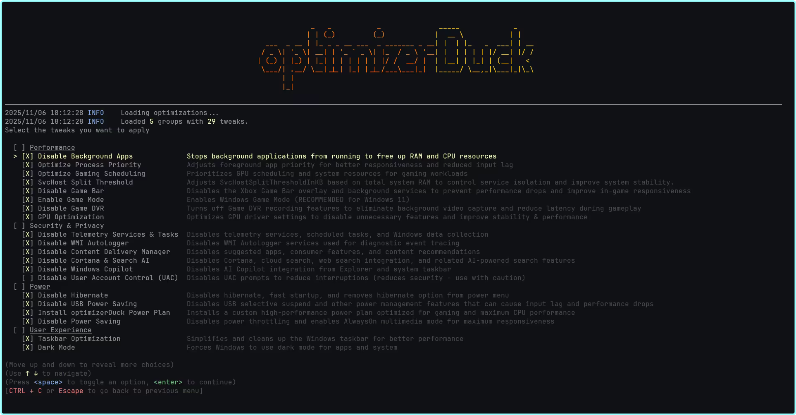
OptimizerDuck 1.3
File Size : 90 Mb
optimizerDuck: a Windows optimization tool designed to enhance system performance while prioritizing user privacy and ease of use. This tool streamlines various processes to help users achieve a smoother and more efficient computing experience.
🌟 Features
Performance
Disable Background Apps: Stops background apps from running to free up RAM and CPU.
Optimize Process Priority: Adjusts foreground app priority for better responsiveness and reduced input lag.
Optimize Gaming Scheduling: Prioritizes GPU and system resources for gaming.
SvcHost Split Threshold: Optimizes service isolation based on system RAM to improve stability.
Disable Game Bar: Disables the Xbox Game Bar overlay and background services to improve in-game performance.
Enable Game Mode: Enables Windows Game Mode for a better gaming experience (Recommended on Windows 11).
Disable Game DVR: Turns off background video recording to reduce latency.
GPU Optimization: Optimizes AMD, NVIDIA, and Intel GPU driver settings for better stability and performance.
Bloatware & Services
Remove Bloatware Apps: Removes pre-installed bloatware to free up storage and system resources.
Debloat Microsoft Edge: Reduces Edge’s system integration and disables unnecessary features.
Configure Services: Disables unnecessary background services to reduce resource consumption.
Power
Disable Hibernate: Disables hibernation and Fast Startup to save disk space and prevent issues.
Disable USB Power Saving: Prevents USB selective suspend to reduce input lag on peripherals.
Install optimizerDuck Power Plan: Installs a custom high-performance power plan for maximum CPU performance.
Disable Power Saving: Disables system-wide power throttling for maximum responsiveness.
Security & Privacy
Disable User Account Control (UAC): Disables UAC prompts for fewer interruptions (use with caution).
Disable Telemetry: Disables Windows data collection services, scheduled tasks, and error reporting.
Disable WMI AutoLogger: Disables diagnostic event tracing services.
Disable Content Delivery Manager: Disables ads, suggested apps, and content recommendations.
Disable Cortana & Search AI: Disables Cortana, cloud search, and web search integration.
Disable Windows Copilot: Disables AI Copilot integration in the taskbar and Explorer.
User Experience
Taskbar Optimization: Cleans up the taskbar by hiding the search bar, Task View, and other clutter.
Enable Dark Mode: Forces dark mode for both applications and the system UI.
Explorer Optimization: Restores the classic context menu, improves folder navigation, and enhances usability.
Optimize Visual Performance: Adjusts visual effects for best performance over appearance.
Disable Notifications: Disables all notifications to minimize distractions.
Optimize Mouse & Keyboard: Disables mouse acceleration and improves keyboard responsiveness.
Install ZwTimerResolution: Installs a service to reduce input lag and improve system responsiveness.
https://github.com/itsfatduck/optimizerDuck/releases
————————————*****————————————
⭐️ OptimizerDuck 1.3 – (90 MB)
RapidGator Link(s)
https://rapidgator.net/file/9cd4de52534e17243c61025a7b482514/OptimizerDuck.1.3.rar
NitroFlare Link(s)
https://nitroflare.com/view/457EE8708C8C8D7/OptimizerDuck.1.3.rar?referrer=1635666



