
 Farid
Farid
📋 QUICK INFO: Team Totoro | 04 April 2026 | 542 MB
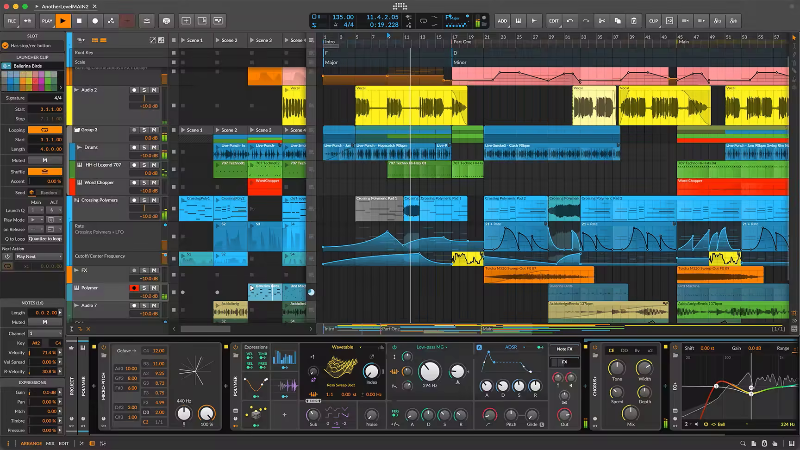
📝 DESCRIPTION: Next-generation music production and performance. Create without limits.
The only software you need to realize any musical idea across every stage of creation. Linear and non-linear workflows, a flexible modular design, 140+ instruments and effects, and over 20GB (and counting) of world-class sound content. Set your sound free on Windows, MacOS, and Linux.
Whatever your destination, Bitwig Studio will get you there.
Finish music fast or go deep on the details. Harness powerful synths and FX or build your own. Improvise and perform, connect your hardware, design the sounds in your head. Discover the DAW that lets you create your way.
Easy to use, no matter your style
On stage or in the studio, Bitwig makes all workflows a breeze. Jam with the clip launcher, arrange on the timeline, and seamlessly integrate your hardware.
Stability you can trust
Bitwig Studio was built on rock-solid foundations, with sandboxed plug-ins and much more. Spend less time dealing with crashes and more time creating.
Make music without limits
Build your own tools in The Grid. Customize devices and connect anything to anything with a universal modulation system. Bitwig’s modular design gives you full creative freedom.
Whats new in this version
Changes in Bitwig Studio 6.0.1[released 25 March 2026]
IMPROVEMENTS
Auto-zoom is now additive instead of replacing of using a fixed height (which eliminates ‘jumping’ when switching tracks/lanes.)[41176]
FIXES
•Performing Duplicate on a track with a playing Launcher clip is no longer out of sync
•Performing Duplicate on a Clip Launcher scene now includes transport automation clips[41305]
•Merge Duplicate Patterns now includes muted clips[41112]
•Layered editing: Expression events can no longer get inserted into multiple audio layers when using Pencil or Spray Can tools[41269]
•Performing Split on a time selection of an audio event now auto-selects the resulting event again (a regression)[41246]
•Root key in transport bar now reacts to touch[41192]
•It is now possible to Paste Launcher scenes again[41307]
•Launcher clips with offset start positions are now properly recorded to the Arranger
•Fixed sluggish GUI when having long clips with incredibly short loops on the Arranger
•Track selection now updates more reliably when clicking in the Arranger[41170]
•[SHIFT]+double-click no longer enters group tracks (a regression)[41066]
•Extracting a Drum Machine cell by dragging it to another track no longer creates a clip with all notes (a regression)[41057]
•ParSeq-8 and Steps (Sequence) modulators: No longer shows the last step as active when Timebase is set to Hold and Phase is set to 0º[39907]
•Striped lines (for hard audio cuts) are now only painted in Detail Editor Panel- and not on the Arranger Timeline Panel
•Auto-zoom of the main track lane in Automation Mode[A] now zooms the correct wrong lane
•Audio event context menus are now more consistent[41167]
•Couldn’t select ‘main’ clip slots on group tracks unless the tracks were unfolded
•Convert between Object and Time Selection was not working on Arranger loops (a regression)[41245]
•Dragging the Time Selection tool on the Arranger no longer includes additional tracks "too late" when moved slowly[41142]
•Automation points for plug-ins now have a label for their value in the Inspector Panel. It is Value.[41169]
•DAWproject import: Track automation no longer casually lands in a 2-bar clip[41237]
•ALS Import: Certain plug-ins parameter automation was mapped to "Unknown Parameter"
•ALS Import: Tempo automation imported as a tempo of 20 (a regression)[41258]
•Dragging a modulator over track headers does not change track focus anymore (regression)[41267]
CRASHES FIXED
•Fixed crash when selecting target layer in the header of a note editor in Track context[41182]
•Fixed crash when dragging a track whose Flying Automation Lane is targeting send automation into another project[41188]
•Fixed crash when performing Scale Each 200% on a sequence of Arranger clips[40553]
•Fixed crash when using Pencil tool for drawing velocity, in some layered editing cases[41174]
•Fixed crash when dropping an audio clip from the Browser Panel onto a Drum Machine cell[39779]
•Fixed crash when opening certain pre-v6 projects[41194, 41217]
•Fixed crash when changing device order inside an Instrument Selector device[40116]
•Fixed a rare crash when selecting expression events in the Piano Roll Editor[39919]
•Fixed a rare crash when using the Spray Can tool[41119]
•Fixed crash when releasing a touch interaction in the Piano Roll Editor, in certain cases[41083]
•Fixed a rare crash when trying to drop an automation clip onto an incompatible lane[40059]
•Fixed crash when stopping Launcher recording for a parameter of a missing plug-in[41158]
•Fixed an audio engine crash when an audio track was monitoring, and the input was set to the output of a non-existent device[38320]
•Fixed a rare crash when adding a MIDI automation lane via dialog to a track that was deleted in the meantime[41183]
•Fixed crash when performing Split at Onsets on a, um, comping region[40542]
•macOS: Fixed a rare crash while window is opening[39148]
System Requirements
macOS 12 (Monterey) or newer.
————————————*****————————————
💾 Bitwig Studio 6 V6.0.1 MacOS (542 MB)
🔗NitroFlare
https://nitroflare.com/view/4C5D26A5BC47195/Bitwig.Studio.6.V6.0.1.MacOS.rar?referrer=1635666
🔗RapidGator
https://rapidgator.net/file/fc89e33505b9d4f9af9b5200a0339e08/Bitwig.Studio.6.V6.0.1.MacOS.rar



