
 Farid
Farid
De Bloater Pro ROOT V0.30
Requirements: Android 6.0+ | Size: 2.30 MB
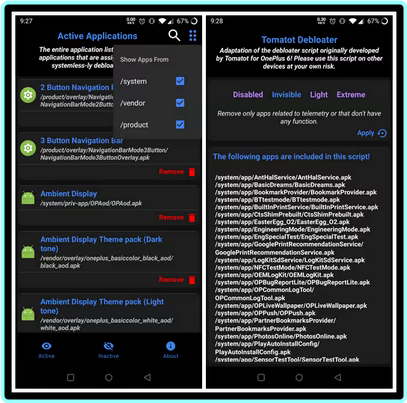
De-Bloater is an application using the power of Magisk/Kernel SU to de-bloat unwanted applications systemless-ly.
De-Bloater requires Root Access and a fully functional Magisk environment, including modules, for proper working. As a result, De-Bloater won’t work with other rooting solutions as well as in Magisk core-only mode.
Features
– Easily remove system applications from "/system", "/vendor", and "/product" directories (Reboot required).
– Restore de-bloated apps, either individually or as a whole (Reboot required).
– Includes pre-defined de-bloated scripts (Universal Android and Tomatot debloater).
– Elegantly designed user interface with an auto-dark/light theme.
– A lot more.
Requirement
De-Bloater requires Root Access and a fully functional Magisk environment, including modules, for proper working. As a result, De-Bloater won’t work with other rooting solutions as well as in Magisk core-only mode.
How to Use
Open the app, click the remove button on each app you want to remove. The selected apps will be removed systemless-ly after a reboot. To restore an app, either Reset Module (on the top menu) or selectively restore from the second page. Please note that a restart is necessary to get any of the changes in effect.
How it works
The app will systemless-ly replace the selected APKs by making a Magisk module. As a result, you will see a new Module (name: De-bloater).
Troubleshooting
In case, if you accidentally remove some important apps and your phone bootloops, please delete "/data/adb/modules/De-bloater" via recovery.
————————————*****————————————
⭐️ De Bloater Pro ROOT V0.30 – (2 MB)
RapidGator Link(s)
https://rapidgator.net/file/3abe673558947fb5a0d0dae3b7fff729/De.Bloater.Pro.ROOT.V0.30.rar
NitroFlare Link(s)
https://nitroflare.com/view/E17F0045153C506/De.Bloater.Pro.ROOT.V0.30.rar?referrer=1635666



